AI & Banking
What does AI cost for data analysts? Chat, SQL, dashboards, and agents compared
Chat exploration, SQL generation, dashboards, and agent pipelines: What AI really costs data analysts in 2026, with figures and sources.
•
acceleraid Editorial Team
6 min. read
01
Acquire
Recognize signals
02
Onboard
Control activation
03
Grow
Next Best Action
04
Retain
Reduce churn
05
Reactivate
Reclaim potential
On August 3, 2026, a look at the current price lists of major AI providers shows just how different the cost profiles for data analysts have become: A chat subscription for exploratory questions costs a few dollars a month, while a fully automated analysis pipeline with several hundred iteration steps can consume several dollars per session. Anyone budgeting as an analyst or analytics manager must distinguish between these cases — otherwise, too much model is purchased for trivial questions, or too little is provided for complex pipelines.
Four types of use, four cost profiles
For data analysts, AI-supported tasks can be roughly divided into four categories: data exploration in chat, SQL generation, dashboard and report creation, and fully agentic analysis pipelines where a system independently writes, executes, reads, and iterates code. Each category has its own cost pattern because token consumption, model requirements, and usage limits differ significantly.
With pure chat exploration – "Show me the sales trend by region" or "Explain this deviation" – medium to cheap models and a few thousand tokens per question are usually sufficient. The situation is different as soon as an agent executes code, reads intermediate results, and corrects them multiple times: Here, the context grows from run to run, and the costs rise disproportionately.
What BI and analysis tools cost today
The software landscape for data-driven teams has become highly differentiated in recent months. An overview of the most important tariffs as of August 2026:
Tool | Tariff | Price | Source |
|---|---|---|---|
Microsoft 365 Copilot | Enterprise | $30.00 / user / month | |
Power BI | Pro | $14.00 / user / month | |
Power BI | Premium Per User | $24.00 / user / month | |
Databricks Genie | Pay-as-you-go | 150 DBU/user/month free (≈ $10.50 US East) | |
Snowflake Cortex / Intelligence | AI Credits | $2.00 / AI Credit (Global Routing) | |
Hex | Professional / Team | $36 / $75 per editor / month | |
Julius AI | Plus / Pro | $20 / $45 per month |
The range of billing models is striking: Microsoft and Hex work with classic user licenses, Databricks and Snowflake with consumption-based credits, which can quickly grow beyond the license fee with intensive use. Snowflake points out an example in its own documentation where AI credits incur additional warehouse compute costs for executing the generated SQL – 100 platform credits plus 100 AI credits add up to 500 US dollars there (Snowflake AI Pricing). Anyone who only budgets for the license fee underestimates the actual invoice in such cases.
Agentic analysis costs many times more than chat
The biggest cost jump does not occur between models, but between usage patterns. A study by the Stanford Digital Economy Lab together with Microsoft Research shows: Agentic tasks consume up to 1,000 times more tokens than simple chat or code reasoning queries – and the cost driver is predominantly the input, not the output (Stanford Digital Economy Lab, Bai et al., Microsoft Research).
Even with the identical model and identical task, token consumption varies by up to 30 times (Stanford). This is partly because an agent reads the previous context again at each iteration step: A 50-turn agent session documented by Vantage comes to around 1,000,000 input and 40,000 output tokens – a ratio of about 25 to 1, with the input accounting for around 85 percent of the total cost. The context grows from about 5,000 tokens in the first run to 25,000 to 35,000 tokens in the 30th run (Vantage).
In concrete terms, this means for the same session: around 6.00 US dollars with a frontier model (Opus 4.6) compared to about 0.60 US dollars with a cheaper model (Composer 2 Standard) – a factor of 10 for a comparable task (Vantage). Extrapolated to a team of 25 with two sessions per day, this results in around 72,000 US dollars per year with the more expensive model compared to 7,200 US dollars with the cheaper one – excluding additional subscription fees (Vantage). Important to note: More tokens do not automatically mean more accuracy. The Microsoft Research study shows that the success rate saturates as token consumption increases, and its optimum is often at a medium cost level (Bai et al.). For analysis teams, this means: Prompt caching, context budgets, and model routing are more effective cost levers than simply choosing the most expensive model – especially since models are poor at predicting their own future token consumption (correlation between self-estimation and actual consumption is at most 0.39) and hard budget limits are therefore sensible (Bai et al.).
How good is AI-generated SQL really?
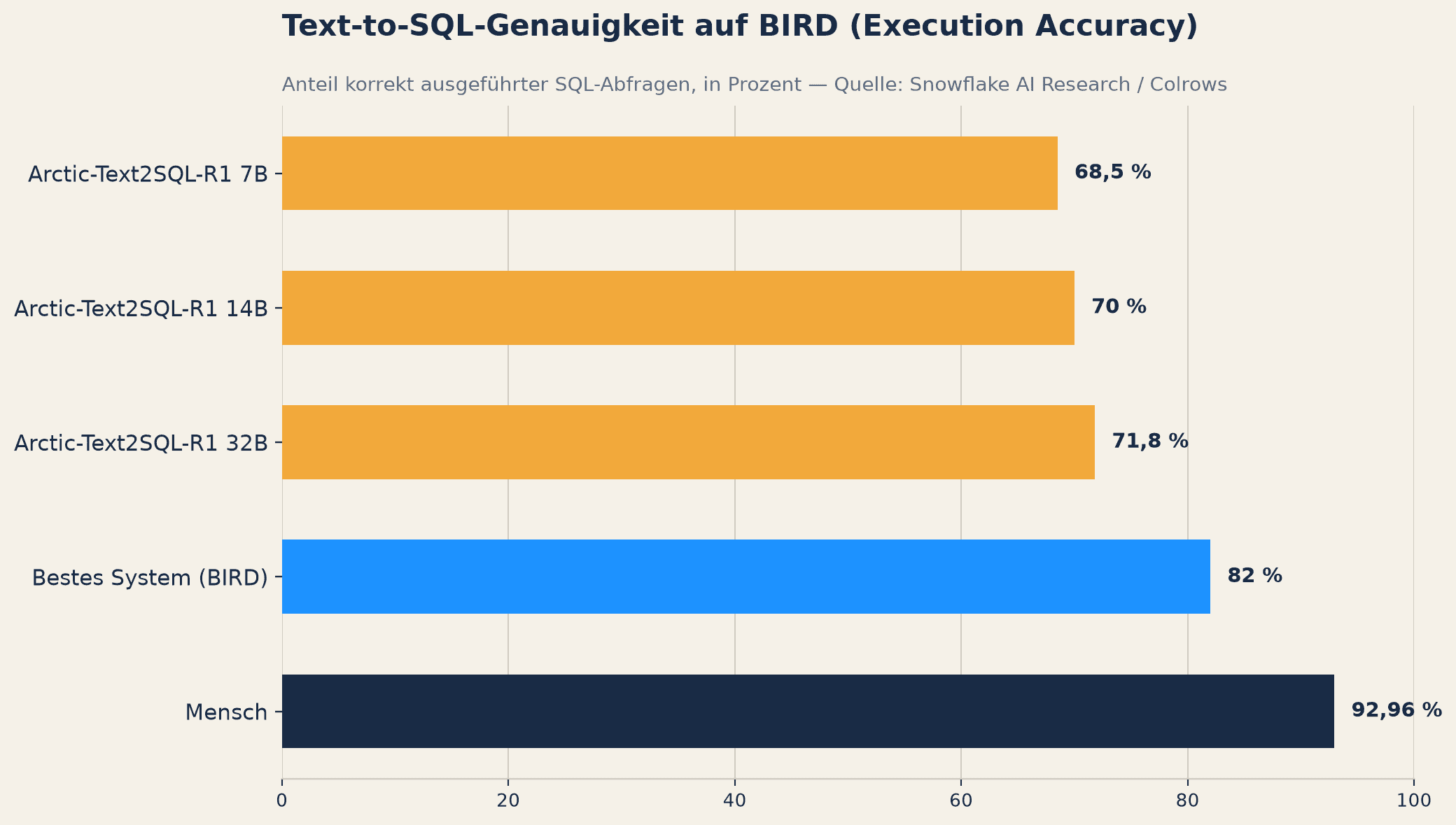
For SQL generation, the BIRD benchmark provides a resilient basis for comparison. Specialized small models perform surprisingly well there: Arctic-Text2SQL-R1 with 7 billion parameters achieves 68.5 percent Execution Accuracy, the 14B version 70.0 percent, and the 32B version 71.8 percent – the latter was State of the Art across all open and proprietary models at the time of its release, with up to 95 times fewer parameters than the previously leading systems (Snowflake AI Research). The best known system on BIRD comes to around 82 percent, human analysts to 92.96 percent (Colrows).
However, these numbers relativize significantly as soon as real enterprise data models come into play. When switching from the Spider 1.0 benchmark to the significantly more complex Spider 2.0 – 632 real enterprise workflows, some with over 1,000 columns – the accuracy of GPT-4o drops from 86.6 to 10.1 percent, and for an o1-preview agent from 91.2 to 21.3 percent (Colrows). The decisive lever is not the model size, but the semantic layer: With a knowledge graph, accuracy increases from 16.7 to 54.2 percent, with a Snowflake semantic model from 51 to over 90 percent, and with a dbt semantic layer from 84–90 to 98–100 percent for eleven tested questions (Colrows).
When is the cheap model enough?
A clear recommendation for action for analysis teams follows from this evidence: For routine SQL on cleanly modeled, well-documented data models, cheap models of the Haiku, Flash, or FlashX class are sufficient – accuracy depends more on the semantic layer than on the model size (Colrows). Frontier models, on the other hand, justify themselves for large, inconsistently named enterprise schemas and multi-step analysis questions where a model must independently chain several intermediate steps.
API prices themselves show an enormous downward spread: qwen-flash costs 0.05 US dollars per million input tokens, GLM-4.7-FlashX 0.07 US dollars, and Gemini 2.5 Flash-Lite 0.10 US dollars (Alibaba Model Studio, Z.ai, Google). For many chat explorations and simple SQL queries, these are no longer serious cost factors – the actual investment then lies not in the model, but in building a resilient semantic layer over your own data.
If you want to dive deeper into the cost logic of individual models, you will find a detailed categorization in our article on Model costs per task type. For teams considering running their own models, it is also worth taking a look at our analysis of Costs up to production operations in self-hosting.
Agility instead of commitment
The figures mentioned show one thing above all: The right choice of model depends on the specific use case, not on a general preference for the most powerful system in each case. A chat query about sales trends needs a different model than an agentic pipeline that independently tests hypotheses and corrects code over dozens of iterations. And this allocation is constantly shifting because both model prices and the capabilities of smaller models change at short intervals.
That is exactly why we built our Assistant at Acceleraid to be model-agnostic: The underlying model can be changed at any time – from a cheap model for routine queries to a more powerful one for complex agentic analyses, or vice versa, as soon as the cost-benefit equation changes. Knowledge, contexts, and configurations remain fully intact, regardless of which model is currently working in the background.
Before budgeting your analysis setup, it is worth answering the following questions:
What percentage of our AI-assisted analyses run as a simple chat and what percentage is already agentic with multi-step code execution?
How good is our semantic layer (data model, metric definitions, documentation) – and would it noticeably improve the accuracy of a cheaper model?
Have we defined hard budget and execution time limits for agentic pipelines, or do we rely on cost estimates from the models themselves?
Can we change the model behind our analysis tools without losing context, configurations, and accumulated knowledge?
Illustration: AI-generated. AI-supported content: In creating our articles, we use AI technologies and automated agents, including those from Microsoft, Google, OpenAI, Anthropic, and other providers. Topics, professional direction, and final approval lie with our team.
Further Insights
We use cookies 🍪
Strictly necessary cookies (e.g. Pipedrive forms) remain active. With your consent, we also use Google Analytics (analytics) and Leadfeeder (visitor identification). Learn more in our Privacy Policy.